← All work RICE Smart · Study Companion Chatbot

Case Study · Mar 2024

RICE Smart

Study Companion Chatbot

  • EdTech
  • Conversational UX
Downloads
100K+
Play Store rating
4.5

Adding a personalised in-app chatbot to a 100K+ download EdTech platform, so shy students get instant answers without ever raising a hand.

Overview

A leading EdTech app, missing a voice

  • 100K+

    Downloads

    EdTech app

  • 4.5

    Star rating

    on the Play Store

RICE Smart is an EdTech app with over 100,000 downloads and a 4.5-star rating, built around live doubt-clearing sessions. The objective: introduce a personalised chatbot capable of answering any user query related to the courses they’ve purchased, offering a seamless, interactive learning experience alongside the live sessions.

Problem Statement

Beneficial Sessions, Low Attendance

  1. 01

    Too shy to speak up

    RICE Smart offers doubt-clearing sessions, yet some users shy away from attending — several are simply too timid to engage in front of the class.

  2. 02

    A bot that understands

    The challenge was to build a chatbot that could understand and respond to a wide range of questions across courses and subjects.

  3. 03

    Starting the conversation

    The bot should open the conversation itself by asking what a student was studying, rather than expecting them to know how to phrase a request for help.

Use Cases

What Students Actually Needed

  • 01

    Post-exam clarity

    After a weekly or monthly exam, students want to know exactly which areas to work on.

  • 02

    A sense of standing

    Users want to know their position in class to maintain healthy competition, plus performance by individual subject.

  • 03

    A judgement-free way to ask

    Most users are introverted and shy — a chatbot lets them ask any question, anytime.

  • 04

    Repeatable, limited questions

    A user can ask the same question multiple times, though there’s a limited number of questions allowed per month.

  • 05

    Cross-subject answers

    One question can have multiple valid answers — e.g. Physics and Chemistry both cover Thermodynamics.

  • 06

    A memory of past questions

    Users want to revisit what they asked earlier instead of retyping it.

Possible Solution

My Activity & Self Quiz

01

My Activity

An activity section to help users track their performance: attendance for classes attended, exams attempted, a leaderboard to see current class standing, and an exam summary giving a brief subject- and topic-wise report of where to focus next.
02

Self Quiz

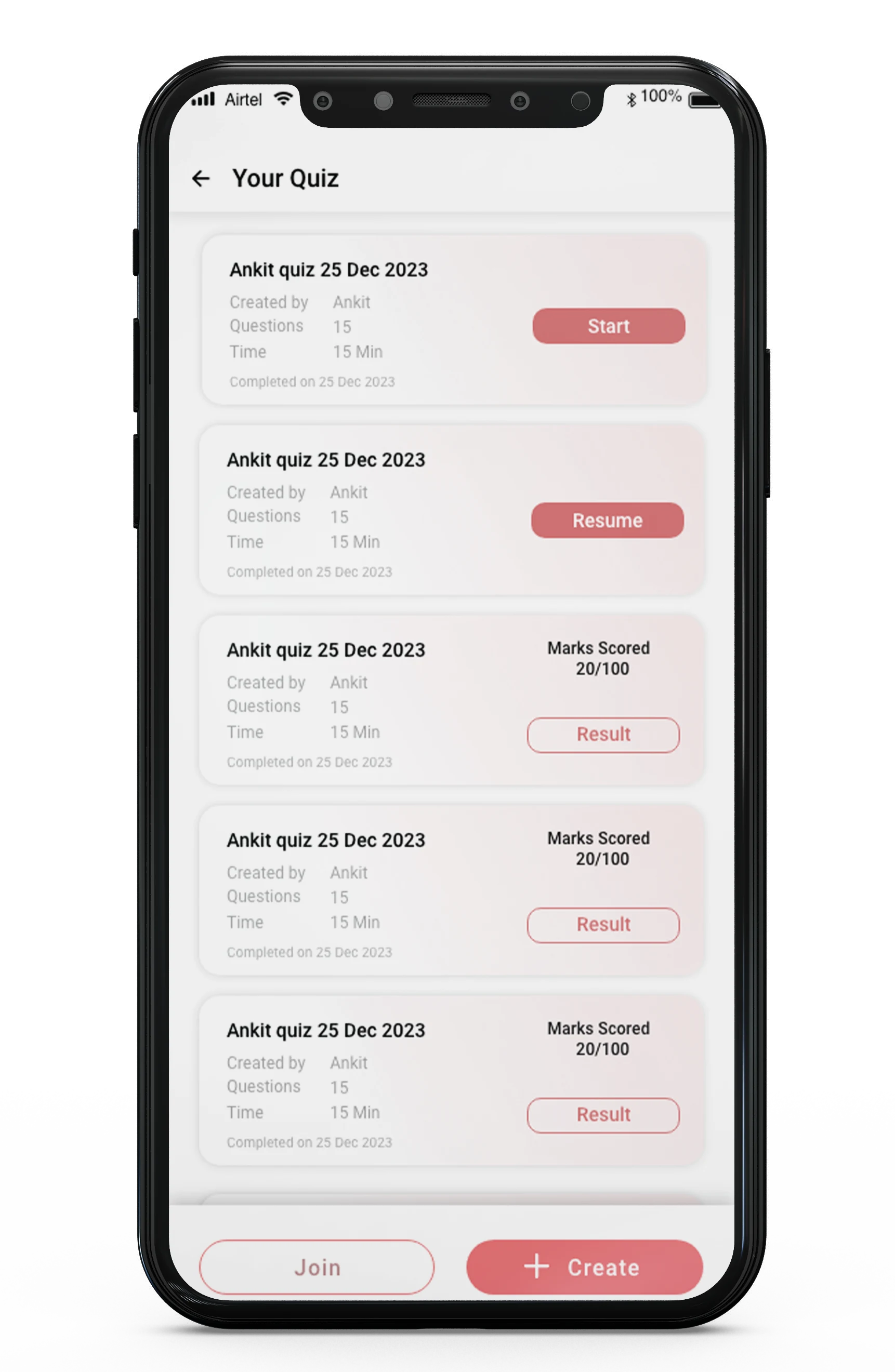
To increase engagement, a self-quiz feature lets a user create a quiz for themselves with AI — just add the subject, topic name and number of questions. The quiz is generated instantly and can be shared with friends, turning revision into something social.

Possible Solution

For the Chatbot

  1. 01

    Repeat-question memory

    If a user asks a question they’ve asked before, they’re redirected straight to the earlier chat instead of getting a fresh answer.

  2. 02

    Course & subject first

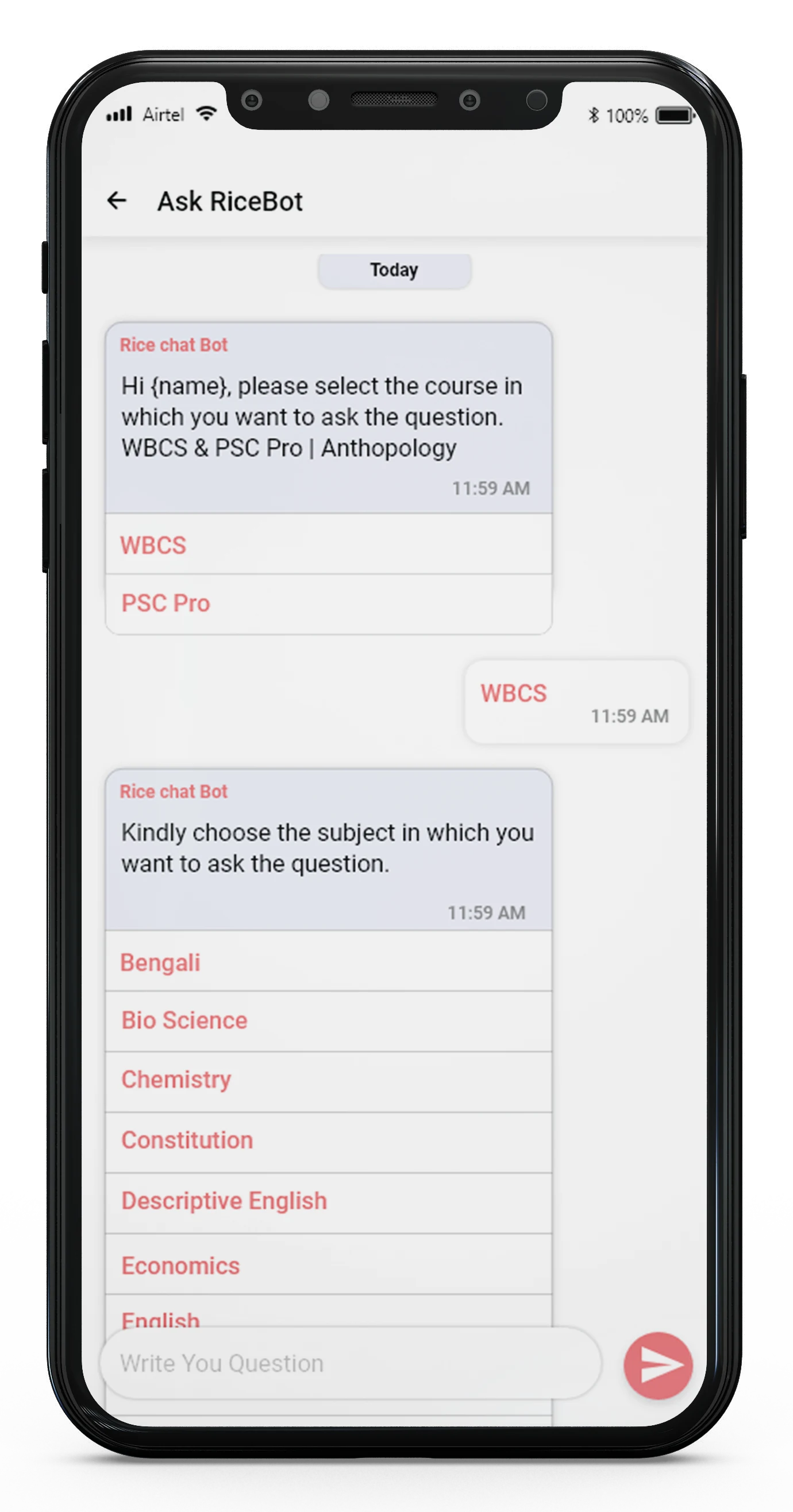
    The user is asked to specify the course and subject before the bot works on a solution.

  3. 03

    A searchable log

    A log and history of past questions is maintained, so a user can come back and check earlier answers anytime.

User Flow

Chatbot & Self Quiz

  1. Ask RiceBotOpens the conversation
  2. Pick the courseWBCS, PSC Pro
  3. Pick the subjectBengali, Chemistry…
  4. Write the questionLimited per month
  5. Asked before?Go to the earlier chat
  6. Bot answersCan span subjects
  7. Log & historySearchable past questions
  8. My ActivityAttendance, exams, rank
  9. Your QuizStart, Resume, Result
  10. CreateSubject, topic, questions
  11. Quiz generatedBy AI, instantly
  12. Share with friendsRevision, together

Course and subject first

RiceBot asks which course, then which subject, before the student writes anything.

Never answer twice

A question asked before goes straight to the earlier chat; every answer is kept in a searchable log.

Quiz yourself, share it

Create a quiz from a subject, topic and number of questions; AI generates it instantly and it can be shared with friends.

RICE Smart: Ask RiceBot conversation asking for the course and subject
RICE Smart: Your Quiz list with Start, Resume and Result, plus Join and Create

Design Screens

UI for the Chatbot

Pick a step to see its screen.

RICE Smart

A quieter way to ask for help

Turning a live, sometimes intimidating doubt-clearing session into an always-available conversation — so getting unstuck never depends on being brave enough to raise a hand.

01 / 09